
Click-to-Call for Web Pages
Overview
Fuze Click-to-Call is a productivity-focused desktop utility designed to streamline communication by enabling users to initiate phone calls directly from web pages with a single click. The software targets professionals and remote teams who frequently engage with contact information online, such as in customer support portals, business directories, or e-commerce platforms. By integrating with web browsers, it reduces the manual effort required to copy and dial phone numbers, minimizing errors and improving workflow efficiency.
The tool is particularly useful for individuals who manage client interactions, conduct sales outreach, or handle customer service inquiries across digital channels. It supports both Windows and Mac operating systems, making it accessible to a broad user base. The developer did not provide additional details about its background or corporate affiliation.
Real-world use cases include sales representatives quickly reaching prospects from a lead list, customer service agents responding to inquiries without switching applications, and remote workers managing communications across multiple platforms. The software operates as a browser extension, enhancing the user’s interaction with web-based content.
Key Features & Capabilities
- One-Click Calling from Web Pages – Users can initiate calls by clicking on Fuze icons displayed next to phone numbers on any webpage, eliminating the need to manually copy and paste numbers.
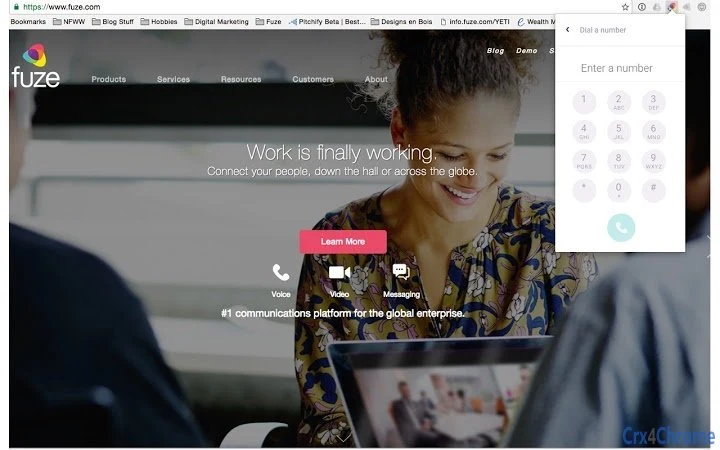
- Address Bar Integration – A dedicated icon in the browser’s address bar allows users to start new calls instantly, even when no phone number is visible on the current page.
- Seamless Browser Integration – The tool functions as a browser extension, working directly within the user’s existing web environment without requiring additional software or setup steps.
- Privacy-First Design – All call initiation processes occur within the user’s browser, with data handling governed by Fuze’s public privacy policy, ensuring user information remains protected.
- Lightweight and Efficient – With a file size of 2.4 MB, the extension is designed for minimal system impact, making it suitable for devices with limited resources.
These features are ideal for users who frequently navigate web content containing contact details. For example, a sales agent reviewing a company’s website can initiate a call with a single click, reducing response time and improving conversion rates. Similarly, a customer support representative can quickly connect with a client without leaving the support portal. The tool enhances call management by centralizing communication actions within the browser, reducing context switching and improving task completion speed.
User Interface, Workflow & Performance
The user interface of Fuze Click-to-Call is minimal and focused on functionality, aligning with the design principles of browser extensions. It presents a small, unobtrusive icon next to phone numbers on web pages and another in the browser’s address bar, ensuring visibility without cluttering the screen. Navigation is intuitive—users simply click the icon to initiate a call, with no additional configuration required.
The workflow is streamlined: the extension detects phone numbers, displays the Fuze icon, and triggers the call through the user’s default calling application. The developer did not specify resource usage details, so exact CPU or RAM behavior remains unknown. However, based on its lightweight file size and extension-based architecture, it is expected to operate efficiently without significant performance impact.
Stability is likely consistent with standard browser extensions, though real-world reliability may vary depending on the browser and system configuration. No performance benchmarks or user-reported issues were provided.
Compatibility & System Requirements
Fuze Click-to-Call is compatible with both Windows and Mac operating systems, supporting a wide range of desktop environments. The software is available in version 1.0.1 and has a file size of 2.4 MB, indicating a compact and efficient installation. The developer did not provide specific hardware requirements, such as minimum RAM, processor speed, or disk space.
Exact system requirements were not listed, so users should ensure their device meets general browser extension standards. Compatibility with major web browsers is implied but not explicitly confirmed. Installation is straightforward, typical for browser extensions, and does not require administrative privileges.
The software operates as a desktop application in conjunction with the browser, meaning it runs alongside the user’s preferred web platform. Platform compatibility information is limited to the provided OS list.
Pros and Cons
Pros
- Enables instant calling from any web page with a single click.
- Intuitive interface with minimal visual interference.
- Lightweight design with only 2.4 MB of disk space usage.
- Free to download and use, with no hidden costs.
- Integrates seamlessly with existing browser workflows.
Cons
- Requires a compatible browser to function, though specific versions were not listed.
- No detailed system requirements were provided for optimal performance.
- Dependent on the user’s default calling application for call execution.
- Privacy policy is external, requiring users to review it separately.
- Limited to call initiation—no advanced call management features included.
FAQ Section
Is Fuze Click-to-Call available for Windows and Mac?
Yes, the software is compatible with both Windows and Mac operating systems, as stated in the product details.
Is the tool free to use?
Yes, Fuze Click-to-Call is available at no cost. The product price is listed as FREE.
Does the extension require an internet connection?
Yes, an active internet connection is required to access web pages and initiate calls through the extension.
Can I use this tool offline?
No, the extension cannot function offline because it relies on web-based phone number detection and browser integration.
What happens to my data when I use this tool?
All call initiation processes are handled within the browser. For detailed information on data handling, users are directed to Fuze’s public privacy policy at www.fuze.com/privacy.
Final Thoughts + CTA
Fuze Click-to-Call delivers a focused and efficient solution for professionals who frequently make calls from web-based sources. Its one-click functionality eliminates friction in communication workflows, offering a seamless experience across Windows and Mac platforms. While it lacks advanced call management features, its simplicity, lightweight design, and zero cost make it a compelling choice for users seeking a reliable, no-frills tool.
The integration with web browsers ensures minimal disruption to existing routines, and its privacy-conscious approach adds an extra layer of trust. For individuals in sales, customer service, or remote collaboration roles, this utility can significantly reduce response times and improve productivity. Download Click-to-Call for Web Pages now to experience faster, smarter communication.







